Adoption analytics
The Adoption analytics page gives administrators a view of how Ask is being used across their organization.
Use it to track active users, session frequency, stickiness, and adoption of agents and tools over time.
Select a reporting period from the date picker at the top of the page. Dashboard metrics and charts update to reflect the selected period.
Overview
The overview cards provide a snapshot of usage for the selected period.

Users
The number of distinct active users during the selected period.
An active user is someone who sent at least one message to an assistant.
Sessions
The average number of sessions per active user during the selected period.
A session represents one user's continuous activity and ends after 30 minutes without a new message.
Agent adoption
The percentage of active users who used at least one purpose-built agent during the selected period.
Tool adoption
The percentage of active users who used at least one configured tool during the selected period.
Period comparison
The percentage shown on each card compares the selected period with the immediately preceding period of the same length.
For example, Past 30 days is compared with the 30 days immediately before it.
Active users
The Active users chart shows how the active user base changes over time.
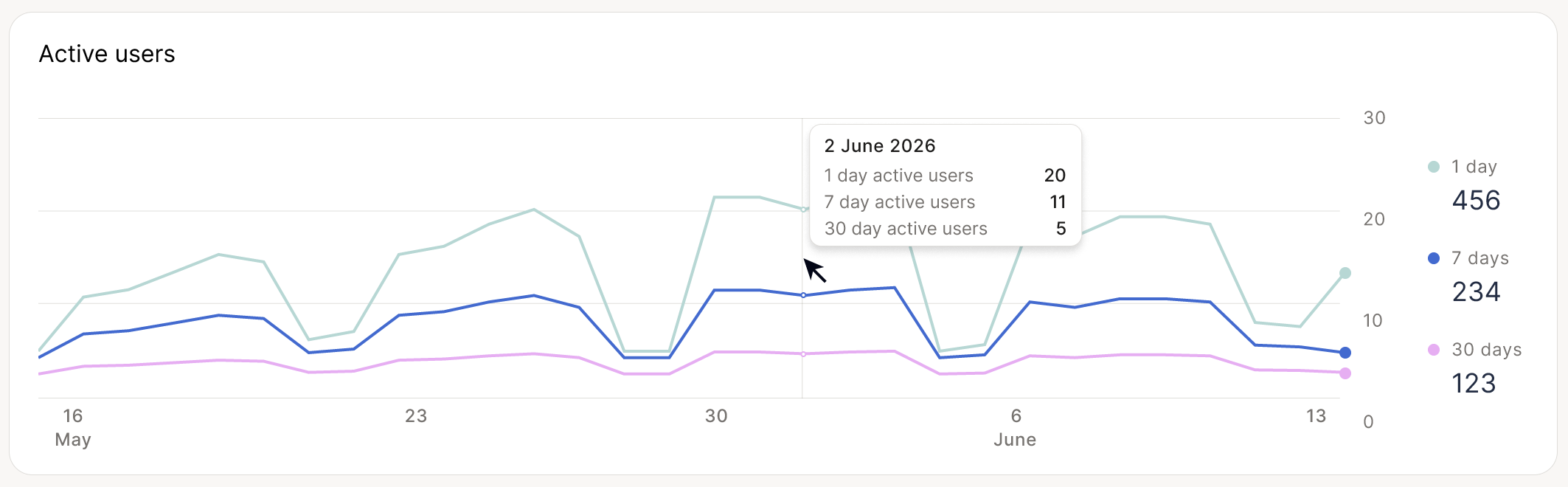
It includes three rolling measures:
| Metric | Definition |
|---|---|
| 1 day | Distinct users active on that day |
| 7 days | Distinct users active during the rolling 7-day window ending on that day |
| 30 days | Distinct users active during the rolling 30-day window ending on that day |
The 7-day and 30-day figures are rolling windows. They are recalculated for every day shown on the chart rather than resetting at the beginning of a calendar week or month.
Hover over the chart to view the values for a specific date.
Stickiness
The Stickiness chart shows how frequently the monthly active user base is active on a given day.
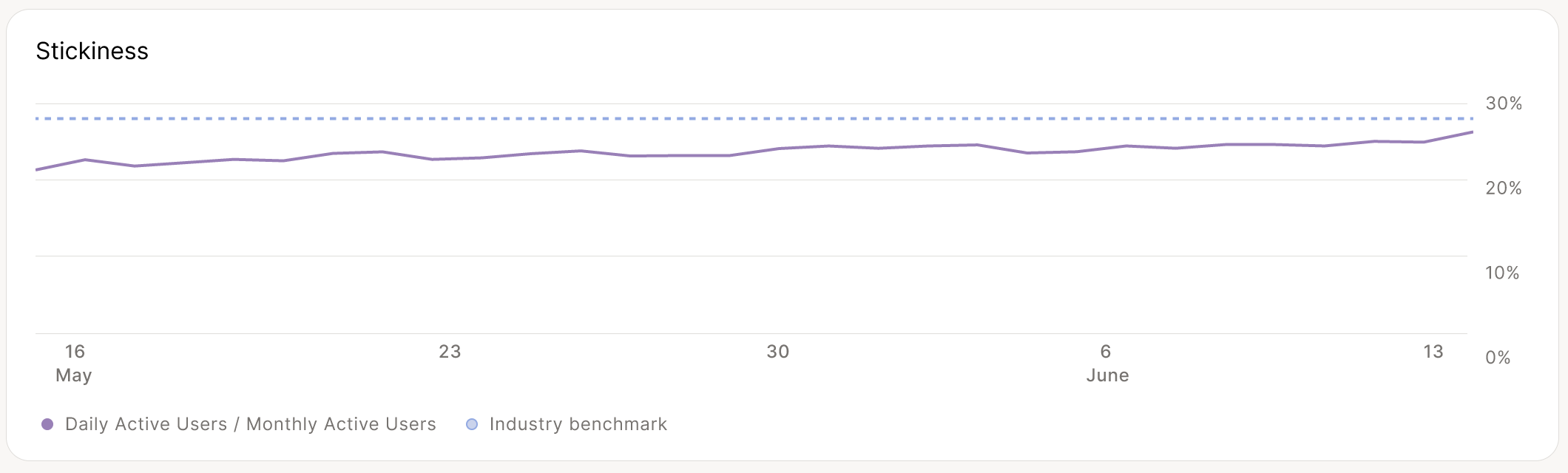
Stickiness = Daily active users ÷ Monthly active users
For example, a stickiness value of 25% means that 25% of the users who were active during the previous 30 days were also active on that day.
The chart shows how this percentage changes over time and may also include an industry benchmark for reference.
Because daily activity naturally fluctuates, stickiness is most useful when viewed as a trend rather than from a single day's value.
Capability use
The Capability use section shows which agents and tools are being used across the organization.
Use the Agents / Tools selector to switch between capability types.
The list ranks capabilities by their total number of users during the selected period. Selecting a capability highlights its usage trend in the chart.
Use the day, week, or month controls to change the time granularity of the trend.
Agents
Agent usage includes work performed with a purpose-built agent. The default Ask assistant is shown separately where applicable.
Tools
Tool usage includes tools that have been configured for an assistant.
Internal platform operations, such as tool discovery, file reading, or knowledge-base retrieval, are not counted as tool adoption.
Downloading the data
Select Download CSV to export the dashboard data for further analysis or reporting.
The export follows the filters and reporting period selected in the dashboard.
Metric definitions
| Metric | Definition |
|---|---|
| Active user | A user who sent at least one message to an assistant |
| 1-day active users | Distinct active users on a given day |
| 7-day active users | Distinct active users in the rolling 7-day window ending on that day |
| 30-day active users | Distinct active users in the rolling 30-day window ending on that day |
| Stickiness | 1-day active users ÷ 30-day active users |
| Session | One user's continuous activity, ending after 30 minutes without a new message |
| Sessions per user | Average number of sessions per active user during the selected period |
| Agent adoption | Share of active users who used at least one purpose-built agent |
| Tool adoption | Share of active users who used at least one configured tool |
About the data
Data freshness
Adoption metrics refresh once per day. Activity from the current day may therefore not yet be reflected.
Local time
Days are calculated using the deployment's local timezone.
Automated activity
Automated and triggered messages are excluded from session metrics so that scheduled activity does not inflate user engagement.