Getting Started
This guide will walk you through the steps to start using the Ask API and make your first API call.
Prerequisites
Before you begin, make sure you have:
- An Ask account
- Basic knowledge of REST APIs
- A tool for making HTTP requests (e.g., cURL, Postman, or your preferred programming language)
Step 1: Generate an API Key
To authenticate your API requests, you'll need an API key:
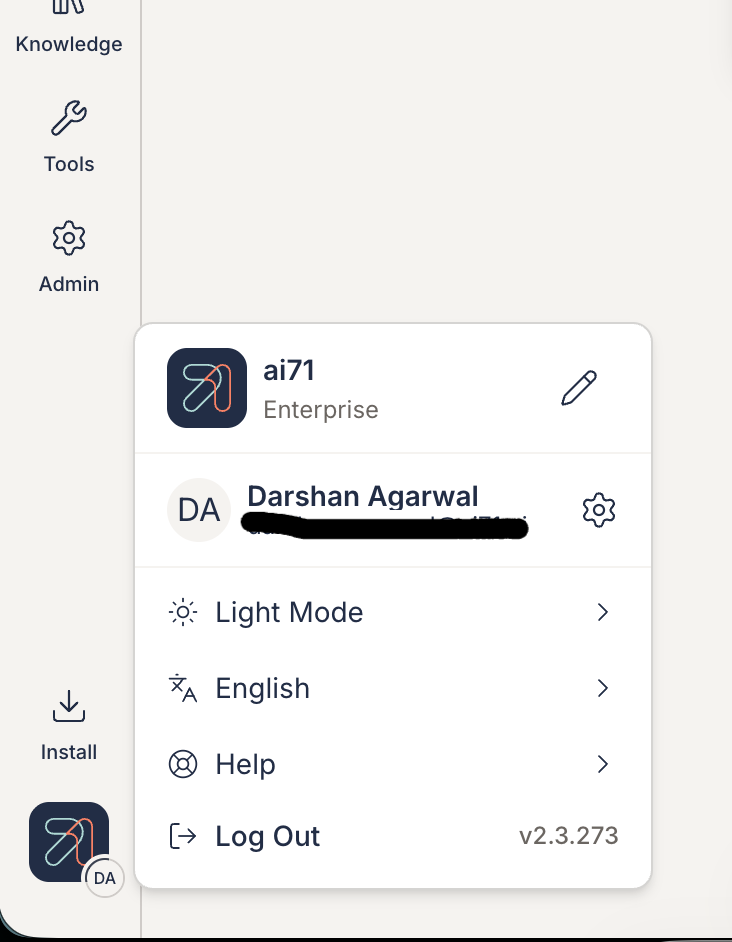
- Log in to the Ask dashboard and click on your profile icon in the bottom-left corner
- Click on the settings icon (⚙) next to your name to open Personal Settings
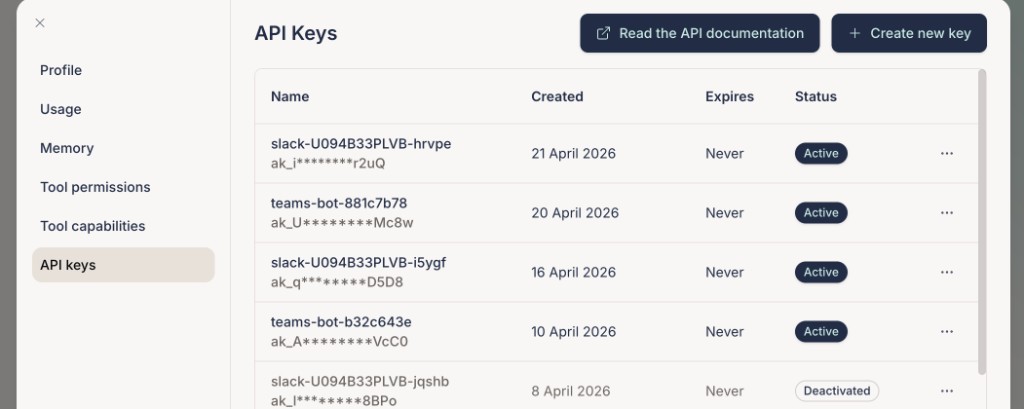
- In Personal Settings, select API Keys from the left sidebar
- Click + Create new key
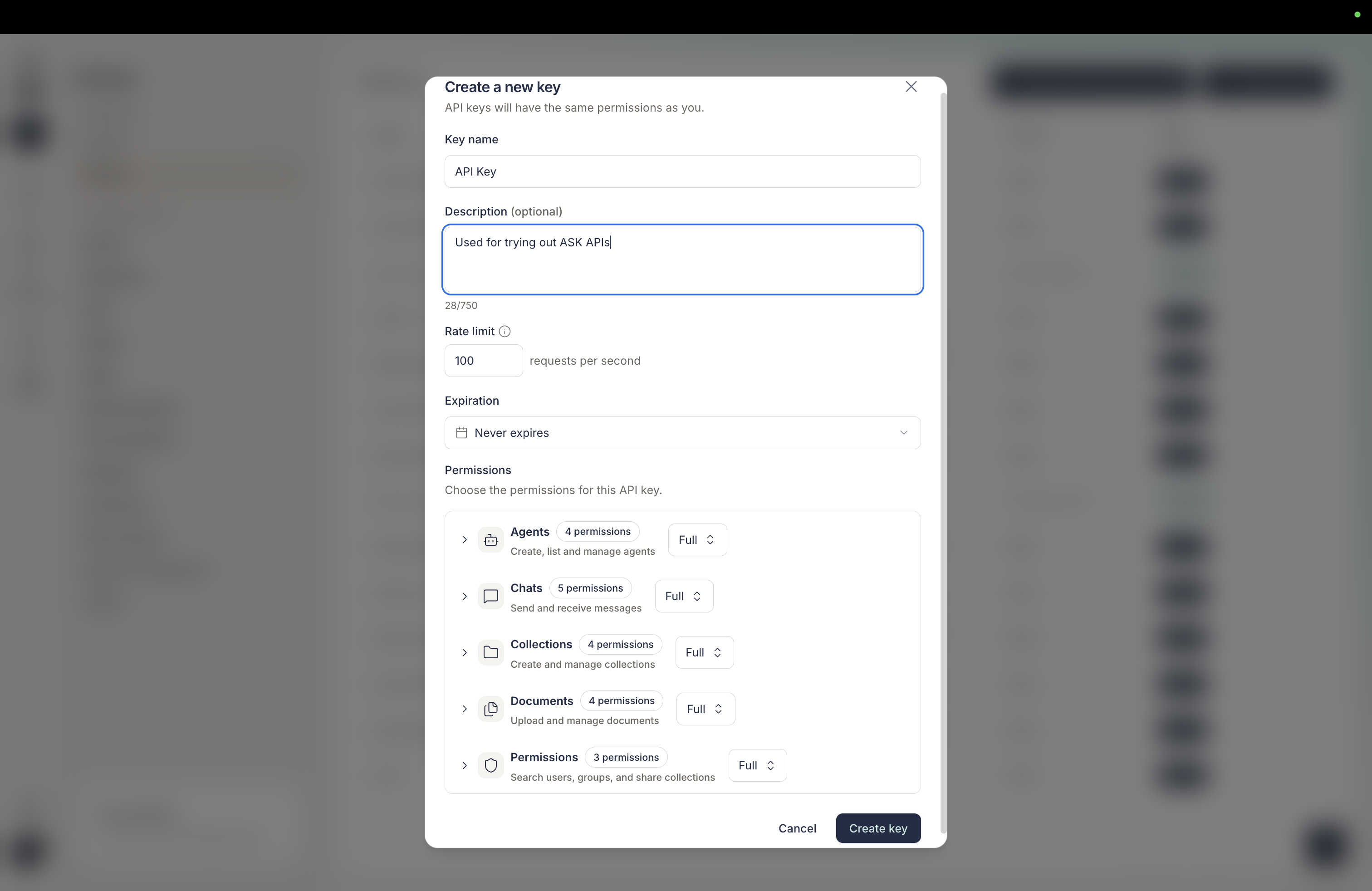
- Give your API key a descriptive name and click create
- Copy the generated API key and store it securely
- Important: You won't be able to see this key again, so save it in a secure location
Step 2: Create an Agent
Before you can start a conversation, you need to create an agent through the Ask UI.
- Log in to your Ask dashboard
- Navigate to the Agents section
- Click Create New Agent
- Configure your agent with:
- A descriptive name
- Relevant settings and parameters
- Any collections you want the agent to access
- Save your agent and note down the Agent ID
Retrieving Your Agent ID via API
If you need to retrieve your agent ID programmatically, you can use the GET /v1/agents/ endpoint:
curl -X GET "https://api.ask.dev.ai71services.ai/v1/agents/" \
-H "x-api-key: YOUR_API_KEY"
This will return a list of all your agents with their IDs and details:
{
  "agents": [
    {
      "id": "agent_123abc...",
      "title": "My_Support_Agent",
      "description": "Customer support agent",
      "role": "assistant",
      "icon_details": {
        "color": "#4F46E5",
        "icon": "chat"
      },
      "created_at": "2024-01-15T10:30:00Z"
    }
  ],
  "pagination": {
    "page": 1,
    "page_size": 10,
    "total_records": 1,
    "total_pages": 1
  }
}
You can also filter agents using query parameters:
search- Search for agents by namesort- Sort bycreated_at,updated_at,title, orrecently_usedsort_direction- Sort direction (ascordesc)pageandpage_size- Pagination controls
Example with search:
curl -X GET "https://api.ask.dev.ai71services.ai/v1/agents/?search=support&sort=recently_used" \
-H "x-api-key: YOUR_API_KEY"
Step 3: Start a Conversation
Now you're ready to communicate with your agent using the POST /v1/conversations/ endpoint.
Basic Request
Here's how to send your first message:
curl -X POST "https://api.ask.dev.ai71services.ai/v1/conversations/" \
-H "x-api-key: YOUR_API_KEY" \
-H "Content-Type: application/json" \
-d '{
  "agent_id": "YOUR_AGENT_ID",
  "query": "Hello! Can you help me with my question?"
}'
Request Parameters
| Parameter | Type | Required | Description |
|---|---|---|---|
agent_id | string | Yes | The ID of the agent you created |
query | string | Yes | Your message or question |
conversation_id | string | No | ID to continue an existing conversation (omit for new conversations) |
stream | boolean | No | Set to true for streaming responses (default: false) |
collection_id | string | No | Specific collection to query against |
is_incognito | boolean | No | Whether to save conversation history (default: true) |
Response
The API will return a response containing the agent's reply and conversation details.
Step 4: Enable Streaming Responses
For a more interactive experience, you can enable streaming responses by setting stream=true:
curl -X POST "https://api.ask.dev.ai71services.ai/v1/conversations/" \
-H "x-api-key: YOUR_API_KEY" \
-H "Content-Type: application/json" \
-d '{
  "agent_id": "YOUR_AGENT_ID",
  "query": "Tell me about your capabilities",
  "stream": true
}'
With streaming enabled, the response will be delivered incrementally as it's generated, providing a real-time conversational experience.
Step 5: Continue a Conversation
To continue an existing conversation, include the conversation_id from the previous response:
curl -X POST "https://api.ask.dev.ai71services.ai/v1/conversations/" \
-H "x-api-key: YOUR_API_KEY" \
-H "Content-Type: application/json" \
-d '{
  "agent_id": "YOUR_AGENT_ID",
  "conversation_id": "CONVERSATION_ID_FROM_PREVIOUS_RESPONSE",
  "query": "Can you tell me more about that?",
  "stream": true
}'
Example Code
Python
import requests

API_KEY = "your_api_key_here"
AGENT_ID = "your_agent_id_here"
API_URL = "https://api.ask.dev.ai71services.ai/v1/conversations/"

headers = {
  "x-api-key": f"{API_KEY}",
  "Content-Type": "application/json"
}

payload = {
  "agent_id": AGENT_ID,
  "query": "What can you help me with?",
  "stream": True
}

response = requests.post(API_URL, json=payload, headers=headers)

if response.status_code == 200:
  print("Success!")
  print(response.json())
else:
  print(f"Error: {response.status_code}")
  print(response.text)
JavaScript (Node.js)
const axios = require('axios');

const API_KEY = 'your_api_key_here';
const AGENT_ID = 'your_agent_id_here';
const API_URL = 'https://api.ask.dev.ai71services.ai/v1/conversations/';

const sendMessage = async () => {
try {
  const response = await axios.post(
    API_URL,
    {
      agent_id: AGENT_ID,
      query: 'What can you help me with?',
      stream: true
    },
    {
      headers: {
        'x-api-key': `${API_KEY}`,
        'Content-Type': 'application/json'
      }
    }
  );

  console.log('Success!');
  console.log(response.data);
} catch (error) {
  console.error('Error:', error.response?.status);
  console.error(error.response?.data);
}
};

sendMessage();
Best Practices
- Secure Your API Key: Never expose your API key in client-side code or public repositories
- Use Environment Variables: Store your API key and agent ID in environment variables
- Handle Errors: Always implement proper error handling for API requests
- Rate Limiting: Be mindful of rate limits and implement appropriate retry logic
- Stream for Better UX: Use
stream=truefor interactive applications to provide real-time feedback
What's Next?
Now that you've made your first API call, explore more features:
- Upload Documents: Add documents for your agent to reference
- Manage Collections: Organize your documents
- Conversation Management: Retrieve and manage conversation history
- Agent Configuration: Customize your agent's behavior